Are you a dedicated gamer still rocking Windows 7 and wondering how to keep your Steam library accessible and enjoyable in 2026? You are not alone. Many gamers, especially those balancing demanding jobs, family life, and budget constraints, find it challenging to always keep up with the latest operating systems and hardware upgrades. This comprehensive guide is crafted specifically for you. We delve into the critical state of Steam support for Windows 7, explore practical workarounds, highlight security considerations, and discuss when an upgrade becomes inevitable. Learn how to troubleshoot common issues, identify compatible games, and make informed decisions about your gaming future without breaking the bank or sacrificing your precious gaming time. We understand the value of relaxation and fun through gaming, and we are here to help you optimize your Steam Windows 7 experience, or plan your next move smartly, ensuring you stay current without falling for hype.
Is Steam officially supported on Windows 7 in 2026?
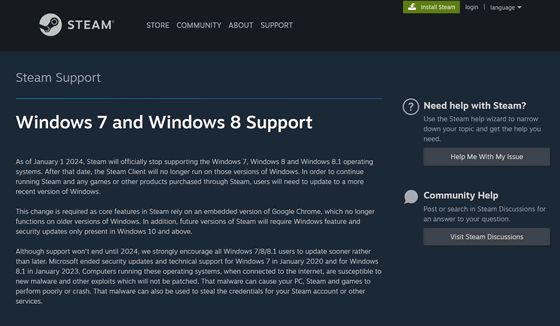
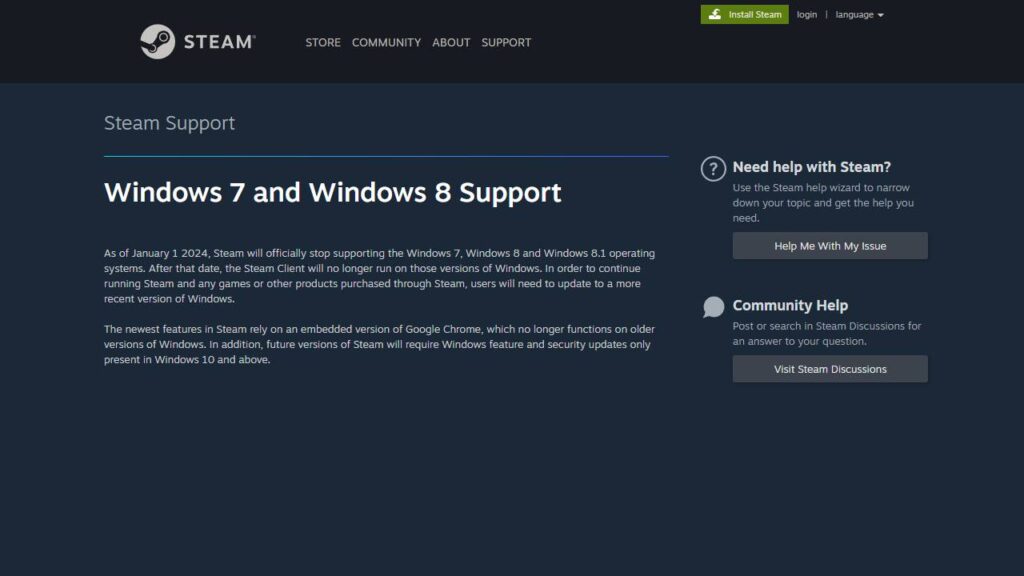
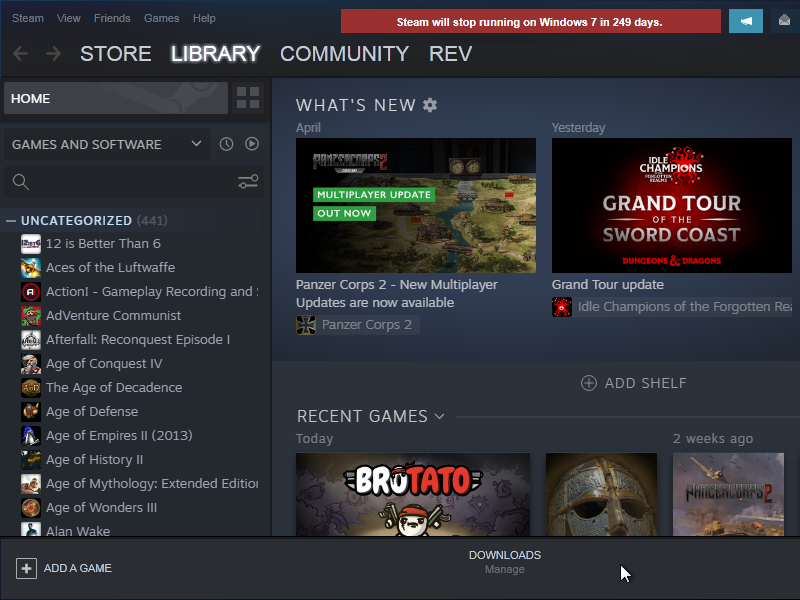
No, Steam officially ended support for Windows 7 on January 1, 2024. This means that in 2026, the Steam client on Windows 7 will not receive any further security updates, bug fixes, or new features from Valve. Users continue at their own risk with increasingly limited functionality and security vulnerabilities.
What are the main risks of using Steam on Windows 7 now?
The primary risks of using Steam on Windows 7 in 2026 are severe security vulnerabilities due to unpatched software, compatibility issues with newer games and Steam client features, and potential performance degradation. Without updates, your system is more susceptible to malware, and many online services may fail to function correctly.
Will all my Steam games run on Windows 7 in 2026?
No, not all Steam games will run on Windows 7 in 2026. While many older titles (pre-2020) and indie games with lower system requirements may still work, most new releases require Windows 10 or 11 due to reliance on modern APIs like DirectX 12. You will experience increasing compatibility problems with newer titles.
How do I troubleshoot Steam issues on Windows 7?
Troubleshooting Steam on Windows 7 involves basic steps like verifying game files, running Steam in administrator mode, updating available graphics drivers (if still supported), and checking internet connectivity. However, deep-seated issues stemming from the unsupported OS or client version are unlikely to be fixable, making an OS upgrade the ultimate solution.
Can I still buy new games on Steam with Windows 7?
You can technically still purchase new games via the Steam store on Windows 7 if the client launches. However, it is highly discouraged. Most new games will not run on Windows 7 due to system requirements, and you risk wasting money on titles that are incompatible with your unsupported operating system.
What's the best way to secure my Windows 7 PC for Steam in 2026?
The best way to secure your Windows 7 PC for Steam in 2026 is to disconnect it from the internet entirely for gaming, or even better upgrade to a supported operating system like Windows 10 or 11. Any online use of Windows 7 without security updates poses a significant and unmitigable risk to your data and system integrity.
When should I upgrade from Windows 7 for gaming?
You should upgrade from Windows 7 for gaming as soon as possible, especially if you want to play new releases, use Steam's online features securely, or protect your personal data. The critical window for a safe and functional Steam experience on Windows 7 has closed, making an upgrade the necessary next step for continued enjoyment.
For many of us, gaming is that vital escape, a way to unwind after a long day of work, connect with friends, or simply sharpen our skills. But what happens when the very platform we rely on starts to move past our trusty hardware or operating system? If you are a gamer still running Steam on Windows 7, you have likely felt that familiar pang of concern. In a world where 87% of US gamers play regularly, often dedicating 10+ hours a week to their passion, staying connected to our games is crucial. However, balancing gaming with careers, family, and life means we cannot always jump on the latest tech trends the moment they hit.
You might be thinking, "My Windows 7 machine still runs great for older titles, why upgrade?" or "I cannot afford a whole new setup right now." These are incredibly valid points. We get it. Modern gaming often demands modern systems, but the reality for many adult gamers the average age being around 36 and nearly 60% of US gamers is about finding that sweet spot between performance, value, and maintaining a lifestyle. This guide is built for you. We are going to dive deep into the world of Steam on Windows 7 in 2026, helping you understand the current landscape, navigate potential pitfalls, and make the best decisions for your gaming future, without any corporate jargon or unnecessary hype.
We will cover everything from the official end of support to practical advice on keeping things running, understanding the risks, and even planning a budget-friendly upgrade when the time is right. Our goal is to empower you with the knowledge to continue enjoying your games, whether you are trying to squeeze a few more months out of your current setup or planning your next big gaming move. Let's get started on ensuring your gaming journey remains as smooth and enjoyable as possible.
What is the Official Status of Steam Support for Windows 7 in 2026?
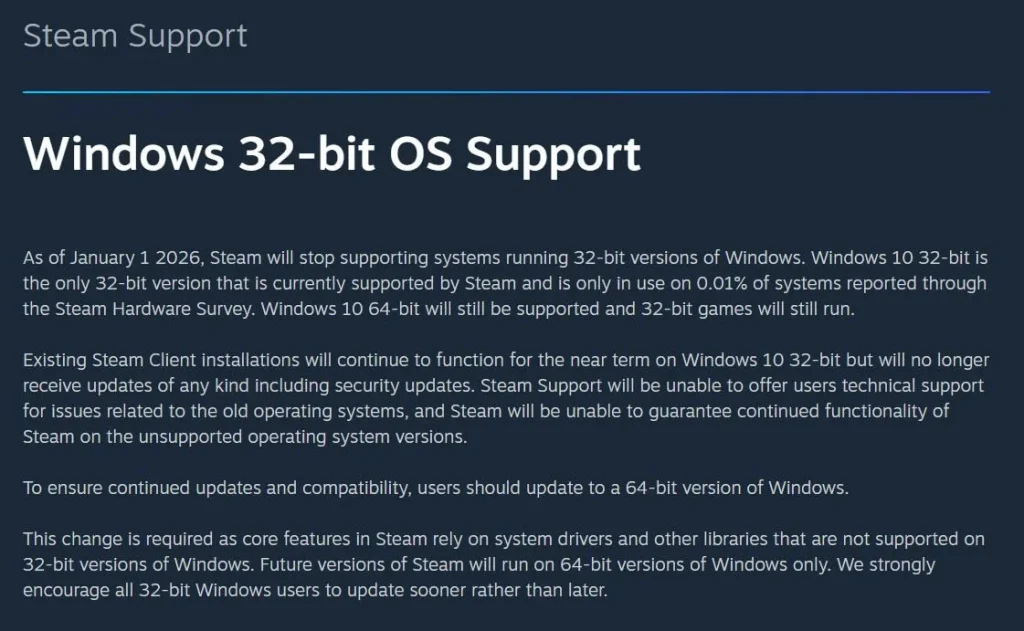
As of January 1, 2024, Valve Corporation officially ended support for the Steam client on Windows 7, Windows 8, and Windows 8.1. This means that in 2026, your Windows 7 system is operating far beyond Valve's official safety net. This decision was largely driven by the fact that core Steam features rely on an embedded version of Google Chrome, which also ceased support for these older operating systems at the same time. The security and functionality of the web components crucial to the Steam client things like the Steam Store, community pages, and even chat can no longer be guaranteed.
For you, the gamer, this translates into a few key realities. While Steam might still launch and function to some degree, especially for offline gaming or older titles, you should not expect any official fixes for bugs, security vulnerabilities, or compatibility issues that arise specifically on Windows 7. New Steam client features, updates, and many modern games will simply not be designed to run on or be compatible with an unsupported OS. It is a stark reality, but one that busy adult gamers need to be aware of to manage expectations and potential frustrations.
Why Did Steam End Support for Windows 7, and What Does It Mean for My Games?
Steam ended support for Windows 7 primarily due to security and technological limitations. As mentioned, the embedded Chrome browser components that Steam relies heavily upon ceased supporting Windows 7. This immediately created a significant security risk, as any unpatched vulnerabilities in Chrome could directly impact Steam users on these older operating systems. Beyond that, modern game development often leverages features and APIs found only in newer Windows versions, like DirectX 12 which is essential for many AAA titles released recently and upcoming ones. Developers simply cannot dedicate resources to maintaining compatibility for an OS used by a shrinking percentage of the user base.
For your games, this means a bifurcated experience. Older titles, particularly those released before 2020 and designed for DirectX 9, 10, or 11, may continue to function. Many classic games from your library, perhaps the ones you play for relaxation after work, are likely still playable offline. However, any game that requires the latest Steam client features, online multiplayer functionality that connects through the Steam network, or modern graphics APIs will likely face significant issues or fail to launch entirely. Multiplayer games are especially vulnerable as server-side updates might clash with an outdated client, impacting that valuable social play experience with friends.
Can I Still Play My Steam Games on Windows 7 in 2026?
Yes, but with significant caveats and a dose of reality. You might find that many of your older, beloved Steam games still launch and are perfectly playable on Windows 7. These are often titles that do not rely on the absolute latest graphics drivers, specific Windows 10/11 features, or constant Steam client updates. Think of classic indie gems, retro RPGs, or strategy games from a few years back. The key is that they are generally self-contained or have minimal dependencies on an active, updated Steam infrastructure.
However, newer games especially those released from late 2023 onwards, or titles that receive frequent updates for online play and new content are increasingly unlikely to work. Their system requirements often explicitly state Windows 10 or 11. Even if a game technically launches, you might encounter performance issues, graphical glitches, or crashes that simply will not be addressed by developers or Valve. For the casual gamer seeking some fun, specific older titles remain viable, but the world of new releases and competitive online play is largely closed off on Windows 7.
What are the Biggest Risks of Using Steam on Windows 7 Now?
The most critical risk of continuing to use Steam on Windows 7 in 2026 is **security**. Without official updates from Microsoft or Valve, your system is a wide-open target for malware, viruses, and phishing attempts. Cybercriminals actively target unsupported operating systems because they know these systems have unpatched vulnerabilities that can be exploited. This is not just about your gaming account; it is about your entire PC and the personal data on it. Imagine losing access to your banking apps or personal files because your gaming machine was compromised.
Beyond security, you face **severe compatibility issues**. New Steam client updates will not install, leading to features breaking or the client refusing to launch entirely. Games requiring those updates will also fail. You will also miss out on **performance optimizations** that newer OS versions provide, meaning even if a game runs, it might not run as well as it could. Finally, the **social gaming experience** is impacted. Features like voice chat, friend lists, and community hubs might be buggy or non-functional, making it harder to connect with fellow gamers, a vital part of modern gaming trends where social play is paramount.
How Can I Try to Keep Steam Working on Windows 7 (Short-Term Workarounds)?
If you are determined to squeeze every last drop out of your Windows 7 Steam setup, here are some short-term workarounds, though none are guaranteed and all come with the inherent risks mentioned:
- Disable Automatic Steam Updates (Use with Caution): If a new Steam client update breaks functionality, you might try to revert to a previous working version if you have a backup. However, this is complex and not officially supported. It also prevents you from accessing new game features or online services that require the latest client.
- Offline Mode: For single-player games, launching Steam in Offline Mode can sometimes bypass issues related to connecting to Steam servers or needing client updates. This essentially turns your Steam library into a collection of executable games.
- Run Older Game Versions (If Available): Some games on Steam allow you to revert to older builds via the game properties Beta tab. If a recent patch broke a game on Windows 7, an older build might still work. This is rare for modern titles but sometimes possible for older ones.
- System Restore Points: Before attempting any Steam updates or major changes, create a system restore point. If something breaks, you can roll back your system to a previous working state. This is a crucial safety measure for any unsupported OS.
- Driver Updates (If Possible): Ensure your graphics drivers (NVIDIA, AMD) are the absolute latest available for Windows 7. While driver support for Win7 is dwindling, an outdated driver can severely impact game performance.
Always remember, these are temporary fixes at best. The long-term solution involves upgrading your operating system.
Are There Specific Games That Still Work Well on Steam Windows 7?
Absolutely! The good news is that your Windows 7 machine can still be a fantastic hub for a huge library of classic and indie games. Generally, any game released before 2020 that does not explicitly require DirectX 12 or Windows 10/11 features is a strong candidate. This includes a vast array of titles:
- Indie Darlings: Games like Stardew Valley, Terraria, Hollow Knight, Celeste, and older FTL or Factorio versions typically have low system requirements and often support older OS versions.
- Classic AAA Titles: Many older Grand Theft Auto titles, BioShock Infinite, Portal 2, Left 4 Dead 2, The Elder Scrolls V: Skyrim, Fallout: New Vegas, and many other gems from the Xbox 360/PS3 era often run perfectly.
- Strategy & Simulation: Civilization V, Cities: Skylines (older versions), Kerbal Space Program (older versions), and a multitude of turn-based strategy games are often less demanding on the OS.
- Retro & Pixel Art Games: These games are designed with minimal hardware in mind and will almost certainly run on Windows 7.
The best way to check is to look at the minimum system requirements on a game's Steam store page. If it lists Windows 7 as supported, or only requires DirectX 11 or older, you stand a good chance. However, always exercise caution with online multiplayer aspects, as server updates might still cause issues even with compatible games.
When Should I Absolutely Consider Upgrading from Windows 7 for Steam Gaming?
The time to consider upgrading from Windows 7 for Steam gaming is now, and it becomes absolutely critical under several circumstances:
- Security Concerns: If you use your Windows 7 PC for anything beyond isolated offline gaming especially for online banking, email, or sensitive personal data you are at severe risk. An unsupported OS is a cybercriminal's playground.
- New Game Desires: If you find yourself constantly unable to play new releases, missing out on trending titles, or your friends are all playing games you cannot access, it is a clear sign.
- Performance Issues: When even older games start exhibiting unexplained slowdowns, crashes, or glitches that are not due to hardware, the OS might be the bottleneck.
- Failed Steam Client Updates: If your Steam client consistently fails to update, or crucial features like the store or chat stop working, your Windows 7 system is effectively cut off from modern Steam.
- Driver Support Ends: When your graphics card manufacturer (NVIDIA, AMD) ceases driver support for Windows 7 entirely, your gaming performance will stagnate or decline.
- Social Gaming Disconnect: If you cannot reliably join multiplayer sessions, use voice chat, or interact with Steam's community features, you are missing a huge part of modern gaming, which thrives on social interaction (e.g., Discord integration, co-op games).
For gamers balancing life, waiting too long can mean more frustration than the cost of upgrading.
What are Budget-Friendly Upgrade Paths from Windows 7 for Gamers?
Upgrading does not have to mean buying a brand-new, top-of-the-line gaming rig. There are several budget-friendly paths:
- Software-Only Upgrade to Windows 10/11: If your current hardware is relatively modern (e.g., an Intel 4th-gen CPU or newer, 8GB+ RAM), you might be able to purchase a Windows 10 or 11 license and perform an in-place upgrade or a clean install. Windows 10 especially is very compatible with older hardware, offering a huge leap in security and compatibility for Steam. You might even find refurbished licenses for a good price.
- Refurbished PCs/Laptops: Look for refurbished desktops or laptops from reputable sellers. You can often find machines with Windows 10 pre-installed and decent specs (e.g., i5/i7 6th-8th gen, 16GB RAM, an older GTX 10-series or RX 500-series GPU) for a fraction of the cost of new. These can easily handle most older Steam titles and many current indie games.
- Component Upgrade (Targeted): If your PC has a good CPU/RAM but an older motherboard, consider upgrading just the motherboard, CPU, and RAM to a more modern, budget-friendly platform (e.g., an Intel i3/i5 10th/11th gen or AMD Ryzen 3/5 with integrated graphics, then add a dedicated GPU later). This lets you install Windows 10/11 and enjoy a much better experience.
- Console Gaming: For ultimate simplicity and a fixed cost, a current-gen console (Xbox Series S/X, PlayStation 5) offers a fantastic gaming experience without the OS headaches. While not Steam, it is a valid alternative for budget-conscious gamers prioritizing hassle-free play.
Remember, an investment in a supported OS is an investment in your digital security and long-term gaming enjoyment.
How Can I Balance Gaming with Life and Maintain Performance on an Older System?
Balancing gaming with life work, family, responsibilities is a universal challenge for adult gamers. On an older system, optimizing performance becomes even more crucial to maximize your limited gaming time. Here are some tips:
- Close Background Applications: Before launching Steam, close all unnecessary programs, web browsers, and background utilities. Every bit of RAM and CPU cycle helps.
- Adjust In-Game Settings: Do not be afraid to lower graphical settings like texture quality, shadow detail, anti-aliasing, and resolution. A smoother frame rate at lower fidelity is often more enjoyable than a choppy experience at high settings.
- Keep Drivers Updated (if available for Win7): If your hardware manufacturers still offer Windows 7 drivers for your GPU, ensure they are up to date. Graphics drivers are critical for gaming performance.
- Defragment Your Hard Drive: If you are still using an HDD, regularly defragmenting it can improve game load times and overall system responsiveness. SSDs do not need defragmenting.
- Clean Up Disk Space: Ensure your drive where Steam is installed has plenty of free space. A full drive can lead to slowdowns.
- Limit Social Features: While social play is great, if your system struggles, consider limiting in-game voice chat or overlay features that consume resources, using external solutions like Discord on a separate device if possible.
By being mindful of your system's limitations and making smart adjustments, you can still enjoy quality gaming sessions even on an older Windows 7 setup.
What Social Gaming Aspects Are Impacted on an Unsupported OS like Windows 7?
For many US gamers, social interaction is a core part of the gaming experience, whether it is cooperative play, competitive esports, or simply chatting with friends on Discord. When using an unsupported OS like Windows 7, several key social gaming aspects are significantly impacted:
- Multiplayer Connectivity: Newer games often rely on updated network protocols or Steamworks features that may not function correctly on an outdated Steam client or OS. This can lead to difficulties joining or hosting games, frequent disconnections, or an inability to see friends online.
- Voice Chat and In-Game Communication: The Steam client's built-in voice chat, and sometimes even in-game communication features, can become unreliable or entirely broken due to browser component issues or OS-level compatibility problems. This forces reliance on external tools like Discord, which itself might struggle if the OS is too old.
- Community Features: Accessing Steam Community Hubs, guides, forums, and friend profiles via the Steam client can be buggy or slow. These features, embedded within the client, are susceptible to the same web component issues that led to Valve ending support.
- New Social Games: Many popular social and cozy games trending this month, designed for multiplayer interaction and cross-play, are built on modern engines and frameworks that require newer operating systems. You will likely miss out on experiencing these with your friends.
- Streaming/Content Creation: If you are interested in streaming your gameplay or creating content, Windows 7 is severely limited. Modern streaming software and capture tools require newer OS features and often do not support Win7, making it impossible to share your gaming experiences with a wider audience.
Ultimately, sticking with Windows 7 isolates you from the evolving social fabric of modern PC gaming, making it harder to connect and play with your peers.
Is it Worth Buying New Games on Steam for a Windows 7 PC in 2026?
In 2026, buying new games on Steam for a Windows 7 PC is a highly risky proposition and generally not recommended. Here is why:
- Compatibility Lottery: Most new games explicitly list Windows 10 or 11 as a minimum requirement. Even if a game launches, you might face severe performance issues, crashes, or unfixable bugs due to an outdated OS and drivers.
- No Refunds for OS Issues: Steam's refund policy typically applies if a game does not work on a supported OS. If the problem stems from your unsupported Windows 7, you might not be eligible for a refund.
- Missed Features & Updates: New games often receive critical day-one patches, content updates, or performance optimizations that require the latest Steam client and OS features. Your Windows 7 system will likely miss out on these, leading to an inferior or broken experience.
- Security Risk: Downloading and running new software, especially games that might have their own launchers or anti-cheat systems, on an unpatched OS increases your exposure to security threats.
- Wasted Money: The frustration of a game not working, coupled with the potential loss of money, far outweighs any perceived benefit. It is better to save that money towards an OS upgrade or a game known to be compatible with your current setup.
Instead of new purchases, explore your existing library of older titles or look for indie games specifically known for their low system requirements and older OS compatibility. Your money is better spent on enjoying what you know works or saving for an upgrade.
Conclusion
Navigating the world of Steam on Windows 7 in 2026 is undoubtedly a challenging endeavor for the dedicated gamer. While your trusty Windows 7 machine might still hold sentimental value and run a host of classic games, the reality of unsupported software, mounting security risks, and dwindling game compatibility cannot be ignored. We have seen how Valve's end of support impacts everything from security to the social gaming experiences many of us cherish.
The key takeaway is this: for your security and long-term gaming enjoyment, upgrading to a supported operating system like Windows 10 or 11 is not just recommended, it's becoming essential. There are budget-friendly paths to get there, and the peace of mind knowing your system is protected and ready for future gaming is invaluable. If you choose to hold onto Windows 7 for a bit longer, do so with extreme caution, prioritize offline play, and be realistic about game compatibility.
Ultimately, gaming should be a source of relaxation and fun, not frustration. Making an informed decision now will ensure your passion remains vibrant and secure. What's your biggest gaming challenge with older systems? Comment below and share your experiences!
FAQ Section
Q: What happens if my Steam client stops working on Windows 7 completely?
A: If your Steam client completely stops working on Windows 7, it's likely due to an incompatible update or a broken web component. You can try reinstalling Steam (backing up your game data first) or, more reliably, you'll need to upgrade your operating system to Windows 10 or 11 to ensure full functionality and security.
Q: Are there any official security patches for Steam on Windows 7?
A: No, Valve officially ended support for Steam on Windows 7 in January 2024. This means there will be no new official security patches, client updates, or bug fixes specifically for Windows 7, leaving your system vulnerable to potential exploits.
Q: Can I transfer my Steam games to a new Windows 10/11 PC?
A: Yes, absolutely! Your Steam game licenses are tied to your Steam account, not your operating system. You can easily download and install your entire library on a new Windows 10 or 11 PC by simply logging into your Steam account.
Q: Will my game saves from Windows 7 transfer to a new OS?
A: Many modern games use Steam Cloud Sync, which automatically stores your saves online, making them accessible on any PC. For games without cloud sync, you'll need to manually locate and copy the save files from your Windows 7 PC to your new system's corresponding game save folders.
Q: Is it safe to play older online multiplayer games on Steam Windows 7?
A: While some older online multiplayer games might still function, it's not entirely safe. Your unpatched Windows 7 OS is a security risk, and the game's servers might have updated protocols that your outdated Steam client cannot fully support, leading to potential security vulnerabilities or connectivity issues.
Q: What if my Windows 7 hardware is too old for Windows 10/11?
A: Most PCs capable of running Windows 7 reasonably well can at least run Windows 10. Check Microsoft's minimum system requirements for Windows 10/11. If your hardware is truly too old, consider a budget-friendly refurbished PC or a console as an upgrade path to enjoy modern gaming securely.
Steam officially ended Windows 7 support in January 2024. Running Steam on Windows 7 in 2026 comes with significant security risks and potential game compatibility issues. While some older games may still function, newer titles and Steam client updates are unlikely to work. Users should consider upgrading to a supported OS for security and optimal gaming performance. Budget-friendly upgrade paths are available to help maintain gaming enjoyment and online safety.
35

Steam To End Windows 32 Bit Support By Jan 2026 What You Need To Know 74701 . Steam Drops 32 Bit Windows Support 64 Bit Only From Jan 2026 Windows 88143 . Asi Pude Usar Steam En Windows 7 2026 Xdoofy92 Steam Windows7 YouTube . Steam 2026 Da Windows 32 Bit Deste Ini Sonland R Yor Donan MHaber Src 2026 Da Windows 32 Bit Destegini . Windows 7 2026 Fikcia Novej Ed Cie Vyzer Ako Zo Skla TOUCHIT Sk Windows 7 2026 Edt 5



Steam Finaliza El Soporte Para Windows 7 Y Windows 8 Steam Windows 7. Steam 2024 Windows 7 Windows 8 1 GIGAZINE Snap4666 . Latest Steam Client Beta Backported To Windows 7 And . Windows 7 2026 Edition The Most Stable Remaster Ever Its Fast 1770866403 . Steam March 2026 Client Update Adds Hardware Specs To User Reviews Steam Client Mar 2026



STEAM Fix For Windows 7 64 Bit YouTube . HOW TO RUN STEAM ON WINDOWS 7 8 8 1 TUTORIAL 2024 2025 YouTube . How To Install Steam On Windows 7 32 Bit And 64 Bit YouTube . Steam Is Running On Windows 7 Again Thanks To A Fan Made Backport 2025 06 13 Image 20 . Steam For Windows Moves To 64 Bit 32 Bit Updates End On January 1 STEAM CLIENT 32BIT 1200x624



ARN Steam Windows 7 8 Media. Windows 7 Final Updates R Windows7 Steam Will Stop Supporting Windows 7 In January 1 2024 V0 . Steam Support For Windows 7 And 8 Is Ending Affecting Less Than 1 95240 01 Steam Support For Windows 7 And 8 Is Ending Affecting Less Than 1 Of Total Players Full . How To Run Steam On Windows 7 YouTube . How To Download Install Steam On Windows 7 In 2025 Still Works



How To Install Steam Windows 7 YouTube . Steam Is Ending Support For Windows 7 And 8 SDN Steam Windows 7 8 Destegini Kesiyor 1 1024x576 . Steam Windows 10 32 Bit 1 2026 549468186 N 1 . Steam Will No Longer Support 32 Bit Operating Systems From 2026 IG News Steam Will No Longer Support 32 Bit Operating Systems From 2026 . Valve Steam Survey April 2026 Windows 11 Grows Mid Range PCs Still Steam Windows 11 Stats


Steam Akhiri Dukungan Windows 32 Bit Di Tahun 2026 Gamebrott Com Steam Support W10 32 Bit. Steam Confirms End Of Support For 32 Bit Windows OS In 2026 TechPowerUp . How To Download And Use Steam On Windows 11 Guiding Tech Steam On Windows 11 2 . Steam To Officially End Support For Windows 7 And 8 In 2024 Steam To End Support For Windows 7 And 8 . Steam Warns Windows 7 And 8 1 Users Now About End Of Support Software Steam End Of Support Message Windows 7


Steam Windows 10 32 Bit 1 2026 Cover Steam Windows 10 32 Bit End 1085x568 . Steam For Windows Moves To 64 Bit 32 Bit Updates End On January 1 Valve Client 64 Bit 850x370 . Steam Windows 7 Theme YouTube . How To Make Steam Work On Windows 7 In 2025 Fix Setup Guide YouTube . Windows 7 Returns With The Stunning 2026 Edition BetaNews Windows 7 2026 640x359